Wishing all my friends , followers and fellow readers a very happy and prosperous new year 2017
Monday, January 2, 2017


Friday, January 1, 2016
Monday, November 3, 2014
Never ending rollouts of cisco nexus switches !!
The datacenter world as I remember has been a exciting stage since 2010. I was very lucky and I was engaged with the cisco nexus series of switches starting summer of 2011. The amount of innovation has been phenomenal and the rate at which capability and services are rolled out is simply amazing.
Cisco has really taken it to the next level and every organization wanted it in their infrastructure. Some simply wanted it because it was the latest and the greatest, some wanted it to reduce their physical footprint and some because of the converged fabric concept it gave. Whatever the reason, cisco nexus switches was and is a big hit.

ITs been 3 intensive years with deployments of these switches. I assumed with just me doing so much of rollouts the adoption must be very widespread . Its amazing to know how many more organization are still adopting it as their first switch. The very sight of the in house engineers looking at it with wide eyes is just amazing. The amount of people who are still learning the cli is amazing.
With its efficiency and usefulness proven in the cloud environment it is the THE switch for THE environment. With the new ACI concept rolling in its going to be taking the datacenter switching fabric to the next interesting chapter.
Irrespective of how the competitors are coming up with their products and the number of innovations being brought into the networking world, its the best time to be in the DC, routing and switching world & a wonderful time to be in the network architecting role. The next 5 years only going to get better.
Cisco has really taken it to the next level and every organization wanted it in their infrastructure. Some simply wanted it because it was the latest and the greatest, some wanted it to reduce their physical footprint and some because of the converged fabric concept it gave. Whatever the reason, cisco nexus switches was and is a big hit.

ITs been 3 intensive years with deployments of these switches. I assumed with just me doing so much of rollouts the adoption must be very widespread . Its amazing to know how many more organization are still adopting it as their first switch. The very sight of the in house engineers looking at it with wide eyes is just amazing. The amount of people who are still learning the cli is amazing.
With its efficiency and usefulness proven in the cloud environment it is the THE switch for THE environment. With the new ACI concept rolling in its going to be taking the datacenter switching fabric to the next interesting chapter.
Irrespective of how the competitors are coming up with their products and the number of innovations being brought into the networking world, its the best time to be in the DC, routing and switching world & a wonderful time to be in the network architecting role. The next 5 years only going to get better.
Friday, September 5, 2014
Friday, July 25, 2014
Long break
Unfortunately I was unable to continue with my prep due to a variety of reasons, but now am back and I sincerely hope to finish my CCIE in 60 days. I will continue to post details of my studies.
Update:
I am unable to find a lab before Feb 2015, which means it is a setback and i have to wait 6months to take up my lab. Well thats the way things are rolling and i will take this time to prepare for my certification. Meanwhile,I will also prepare for a non technical certification which will help my career.
Update:
I am unable to find a lab before Feb 2015, which means it is a setback and i have to wait 6months to take up my lab. Well thats the way things are rolling and i will take this time to prepare for my certification. Meanwhile,I will also prepare for a non technical certification which will help my career.
Wednesday, May 14, 2014
Day 3 - CCIE DC in 60days
Day-3
Spent the day studying IVR concepts. I labbed the scenarios and it was fun.
I labbed the FCOE and FCIP scenarios.
Brushed up on my FCOE and FCIP concepts and the entire day flew past me.
NPV and NPIV features are also labbed up. FCOE NPV scenarios are also completed.
The IVR document from cisco that is very useful is as follows;
http://www.cisco.com/c/en/us/td/docs/switches/datacenter/mds9000/sw/5_0/configuration/guides/ivr/nxos/nxos_ivr/ivrbasic.html
Some useful - free - brush up videos on FCOE is;
Tomorrow its time to review all of these concepts long with QOS & Security features.
Spent the day studying IVR concepts. I labbed the scenarios and it was fun.
I labbed the FCOE and FCIP scenarios.
Brushed up on my FCOE and FCIP concepts and the entire day flew past me.
NPV and NPIV features are also labbed up. FCOE NPV scenarios are also completed.
The IVR document from cisco that is very useful is as follows;
http://www.cisco.com/c/en/us/td/docs/switches/datacenter/mds9000/sw/5_0/configuration/guides/ivr/nxos/nxos_ivr/ivrbasic.html
Some useful - free - brush up videos on FCOE is;
Tomorrow its time to review all of these concepts long with QOS & Security features.
Day 2 - CCIE DC in 60days
Day - 2
Its FCOE and FCIP day. I used the book I love to get the concepts right. The book is beautifully written. Knowing the con pets already, the book was a cakewalk.
But anyone who is staring out new on these concepts i really recommend you reading the book, please refer to my day1 post for this.
Also strongly recommend reading the documentation that cisco has, which is also beautifully written, the link is as follows;
http://www.cisco.com/c/en/us/td/docs/switches/datacenter/sw/nx-os/fcoe/configuration/guide/b_Cisco_NX-OS_FCoE_Configuration_Guide.html
http://www.cisco.com/c/en/us/td/docs/switches/datacenter/mds9000/sw/6_2/configuration/guides/ip_services/nx-os/ipsvc/cfcip.html
I have deployed these many a times so there is nothing completely new but, there is always something new we pickup. There is one more concept i need to pickup and that is IVR. I will include that as part of my study list and lab.
Other considerations that will be useful include the following;
http://www.cisco.com/c/en/us/solutions/data-center-virtualization/fibre-channel-over-ethernet-fcoe/index.html
Alright see you tomorrow after i lab these concepts along with IVR
Its FCOE and FCIP day. I used the book I love to get the concepts right. The book is beautifully written. Knowing the con pets already, the book was a cakewalk.
But anyone who is staring out new on these concepts i really recommend you reading the book, please refer to my day1 post for this.
Also strongly recommend reading the documentation that cisco has, which is also beautifully written, the link is as follows;
http://www.cisco.com/c/en/us/td/docs/switches/datacenter/sw/nx-os/fcoe/configuration/guide/b_Cisco_NX-OS_FCoE_Configuration_Guide.html
http://www.cisco.com/c/en/us/td/docs/switches/datacenter/mds9000/sw/6_2/configuration/guides/ip_services/nx-os/ipsvc/cfcip.html
I have deployed these many a times so there is nothing completely new but, there is always something new we pickup. There is one more concept i need to pickup and that is IVR. I will include that as part of my study list and lab.
Other considerations that will be useful include the following;
http://www.cisco.com/c/en/us/solutions/data-center-virtualization/fibre-channel-over-ethernet-fcoe/index.html
Alright see you tomorrow after i lab these concepts along with IVR
Thursday, May 8, 2014
Day-1 - CCIE DC in 60days
Day - 1
Well if you are preparing for the CCIE DC, I would strongly recommend buying and studying the following book. Its a good starting point;

I started out with Fabricpath. I was moving with pure fabric path without any vpc+ implementation. Then moved to fabric path with VPC+ implementation. Used the nexus 7k and 5k documentation. Labbing the scenarios was fun. Used my design documents and notes used for the implementations I had done to understand how and what I did making things easy for me.
Always remember there are different mac address aging timers for both nexus 7k and 5k. Then I went on to implement the advance features with authentication and adjusting the timers. I tested out some of the failure scenarios for both FP and VPC. So both the nexus switch unique features are covered.
The VPC design best practice guide is a must read.
Day1 rolled pretty quickly reading and practicing the Fabricpath and VPC concepts.
Well if you are preparing for the CCIE DC, I would strongly recommend buying and studying the following book. Its a good starting point;
I started out with Fabricpath. I was moving with pure fabric path without any vpc+ implementation. Then moved to fabric path with VPC+ implementation. Used the nexus 7k and 5k documentation. Labbing the scenarios was fun. Used my design documents and notes used for the implementations I had done to understand how and what I did making things easy for me.
Always remember there are different mac address aging timers for both nexus 7k and 5k. Then I went on to implement the advance features with authentication and adjusting the timers. I tested out some of the failure scenarios for both FP and VPC. So both the nexus switch unique features are covered.
The VPC design best practice guide is a must read.
Day1 rolled pretty quickly reading and practicing the Fabricpath and VPC concepts.
Wednesday, April 30, 2014
CCIE Datacenter in 3-Months
Its been a year now and I still haven't taken up my lab exam yet. Its now time to call the shot.
I have been preparing slowly but steadily, I have had lots of practical experience in realtime implementation. Its now time to certify all that.
I have decided to fix my lab in the month of July. I have just 75days for my lab. I will be documenting my progress as i proceed in this blog.
Iam not sure if this is doable but I will prepare towards it.
I will prepare effectively 6 hours a day. For the first 30days, I will concentrate on Nexus Switching and UCS. Followed by SAN and ACE subjects.I will be using PEC, ciscolive as I progress.
I have done multiple datacenter rollouts using the cisco Nexus, MDS Switches & UCS & am pretty good in configuring them now. But its the CCIE Lab exam & it always throws us a googly.
I will start with Nexus 1000v, because thats something i wanted to clear, thats the least I have worked on, independently.
I have been preparing slowly but steadily, I have had lots of practical experience in realtime implementation. Its now time to certify all that.
I have decided to fix my lab in the month of July. I have just 75days for my lab. I will be documenting my progress as i proceed in this blog.
Iam not sure if this is doable but I will prepare towards it.
I will prepare effectively 6 hours a day. For the first 30days, I will concentrate on Nexus Switching and UCS. Followed by SAN and ACE subjects.I will be using PEC, ciscolive as I progress.
I have done multiple datacenter rollouts using the cisco Nexus, MDS Switches & UCS & am pretty good in configuring them now. But its the CCIE Lab exam & it always throws us a googly.
I will start with Nexus 1000v, because thats something i wanted to clear, thats the least I have worked on, independently.
Tuesday, April 22, 2014
UCS Blade server estimates !!
How many servers can a half width blade server in UCS handle ? Have you considered using fabric path for our datacenter design ?
If you have asked this question or have been at the receiving end of this question or have thought about these questions then please read this post and the followup post and share it as much as possible.
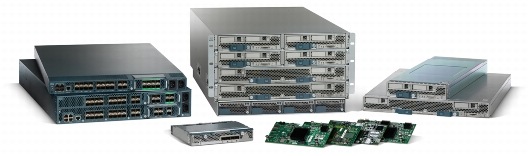
The cisco UCS with B200 M3 half width blade can cater 768GB RAM and has 2 Intel Xeon processor. But we will consider 256GB of ram to have been installed.
You can get enough information about these blades from cisco site in this link.

So if we are basing your VM based on the RAM and processor requirements then;
You can get enough information about these blades from cisco site in this link.
So if we are basing your VM based on the RAM and processor requirements then;
All processor & RAM requirements considered below are hypothetical, I understand all server requirements vary but this only for calculation & understanding. I have considered the 256GB of memory, which is a cost efficient solution. The maximum amount of memory on a B230M2 is 512GB.
Assumption-1:
Assuming each of our VM server requires 16GB RAM, then 256/16=16
We can have 14VM + 1 ESXi per blade (considering processor requirements)
So if we populate 8blades, we get 14*8=112servers per chassis.
If we have 10chassis then we have 112*10=1120 servers
Assumption-2:
Assuming each of our VM server requires 12GB RAM, then 256/12=22
We can have 18VM + 1 ESXi per blade(considering processor requirements)
So if we populate 8blades, we get 18*8=144 servers per chassis.
If we have 10chassis then we have 144*10=1440 servers
Assumption-3:
Assuming each of our VM server requires 8GB RAM, then 256/8=32
We can have 28VM + 1 ESXi per blade(considering processor requirements)
So if we populate 8blades, we get 28*8=224 servers per chassis.
If we have 10chassis then we have 224*10=2240 servers
This is all using VIC card with 40GB uplink per blade.
Now lets assume we are going in for a virtual desktop environment then lets spin up a quick calculation;
Assumption-4:
Assuming each of the desktop requires 4GB RAM, then 256/4=64
we can have 56 desktops per blade(considering processor requirements & memory expansion)
so if we populate 8 blades, we get 56*8=448 desktops peers chassis.
If we have 10chassis then we have 448*10=4480 desktops.
This should give a good idea on the amount of servers that can be accommodated on a blade.
Please do share your comments !
To be continued.......
To be continued.......
Tuesday, April 1, 2014
Nexus 5600 - upgraded datacenter access layer
The datacenter is the hot cake in the high speed information age. Cisco has announced the nexus 5600 series switches for the datacenter access layer. Am excited because we have the true 40G ports available on them which means it can handle more traffic at the access layer.
The newer models are labeled c5672UP & c56128P.
The c5672UP has;
48ports which can handle 1/10G which gives a total of 48x10=480Gbps,
full-duplex on each ports which means a bandwidth of 480x2=960Gbps
6ports which can handle 40G which gives a total of 6x40=240Gbps,
full duplex for the ports which mean a bandwidth of 240x2=480Gps
So a total of 960+480=1440Gbps throughput on the switch. No only that it gives us 16UP ports which supports FC and FCOE. The switch also supports VXLAN.
The c56128P has;
onboard 48ports 1/10G & 4 ports supporting 40G onboard. It also supports  two expansion slots to support 24 ports of 10 Gigabit Ethernet and FCoE or 8/4/2-Gbps Fibre Channel and two ports of 40 Gigabit Ethernet using QSFP optics.
It has a lot more packed in. Further details can be found here in the cisco data sheet.
Verified scalability guide for version 7.0 version of the NXOS for the 5K series of switch will be of help to know how much the device can support.
The newer models are labeled c5672UP & c56128P.
The c5672UP has;
48ports which can handle 1/10G which gives a total of 48x10=480Gbps,
full-duplex on each ports which means a bandwidth of 480x2=960Gbps
6ports which can handle 40G which gives a total of 6x40=240Gbps,
full duplex for the ports which mean a bandwidth of 240x2=480Gps
So a total of 960+480=1440Gbps throughput on the switch. No only that it gives us 16UP ports which supports FC and FCOE. The switch also supports VXLAN.
The c56128P has;
onboard 48ports 1/10G & 4 ports supporting 40G onboard. It also supports  two expansion slots to support 24 ports of 10 Gigabit Ethernet and FCoE or 8/4/2-Gbps Fibre Channel and two ports of 40 Gigabit Ethernet using QSFP optics.
It has a lot more packed in. Further details can be found here in the cisco data sheet.
Verified scalability guide for version 7.0 version of the NXOS for the 5K series of switch will be of help to know how much the device can support.
Friday, March 28, 2014
CCIE Datacenter tips from a CCIE
I was on youtube and found this video from cisco live Milan on the cisco channel;
He is a CCIE working for cisco who is now certified in DC track.
He is a CCIE working for cisco who is now certified in DC track.
Saturday, February 1, 2014
HP MoonShot - Will it go the distance
I am looking into the server hardware technology, with highly competitive market. The world of vitalization has taken the server world by storm and we have highly agile and feature packed hardware's to support them.
So lets look at the hardware part of it !!

I attended a strategic meeting and was interested in the HP moonshot product. Its a cartridge server. It has one big rack chassis, which can house 45 cartridge at a maximum. Interesting !! The amount of RAM and storage per cartridge appears satisfactory. but it has individual RAM and storage per cartridge. It has two switch modules built in with 6 10G uplink interfaces. But it is based on Intel atom processor architecture.
Here is the take, so we have a dual processor setup, but its atom processor. So effectively we can run vmware or hyper-v. So when I look at the windows 2012 R2 hardware requirement ..... it is clear we cannot run them on the atom based environment. Hmmmm ... Interesting so what an I run ??
I can run Linux servers !! Infact the POC done by HP also uses some form of linux servers !
Ok so can I run some intensive applications .... Nope !! Can I run database servers..... Nope !!
Now we dont have vitalization which means we can run servers individually on each of the cartridge .... which means its like running individual server boxes except that they are all consolidated into the cartridge !!
So If you want to perform some maintenance on one of the chassis what do you do ?? you plug out the cartridge and move it to another chassis !! so instead of doing a vmotion you perform a physical cartridge motion !! That is of course assuming you have another empty chassis with you!!
Hmmm .. ok ... so are we taking a step backwards ?? maybe not .. this type of system might be useful for smaller organizations who would want to consolidate the individual servers instead of virtualizing them.
Ok what can be the practical use of the moonshot ?? we can use them to house linux based frond end or low processor intense servers. So what market is this product aimed at ?? Simple answer would be for the very low budget market. Its also for a niche market. HP claims its for scale out server setup but lets see how much its getting adopted.
So to help you perform your own analysis;
Here is the link to compare a low end xeon processor which support the hypervisors and windows servers.
Here is the white paper by HP for the moonshot which includes the POC performed by them.
If you are very short on budget or want to have a small test environment this is the stuff for you !!
So lets look at the hardware part of it !!

I attended a strategic meeting and was interested in the HP moonshot product. Its a cartridge server. It has one big rack chassis, which can house 45 cartridge at a maximum. Interesting !! The amount of RAM and storage per cartridge appears satisfactory. but it has individual RAM and storage per cartridge. It has two switch modules built in with 6 10G uplink interfaces. But it is based on Intel atom processor architecture.
Here is the take, so we have a dual processor setup, but its atom processor. So effectively we can run vmware or hyper-v. So when I look at the windows 2012 R2 hardware requirement ..... it is clear we cannot run them on the atom based environment. Hmmmm ... Interesting so what an I run ??
I can run Linux servers !! Infact the POC done by HP also uses some form of linux servers !
Ok so can I run some intensive applications .... Nope !! Can I run database servers..... Nope !!
Now we dont have vitalization which means we can run servers individually on each of the cartridge .... which means its like running individual server boxes except that they are all consolidated into the cartridge !!
So If you want to perform some maintenance on one of the chassis what do you do ?? you plug out the cartridge and move it to another chassis !! so instead of doing a vmotion you perform a physical cartridge motion !! That is of course assuming you have another empty chassis with you!!
Hmmm .. ok ... so are we taking a step backwards ?? maybe not .. this type of system might be useful for smaller organizations who would want to consolidate the individual servers instead of virtualizing them.
Ok what can be the practical use of the moonshot ?? we can use them to house linux based frond end or low processor intense servers. So what market is this product aimed at ?? Simple answer would be for the very low budget market. Its also for a niche market. HP claims its for scale out server setup but lets see how much its getting adopted.
So to help you perform your own analysis;
Here is the link to compare a low end xeon processor which support the hypervisors and windows servers.
Here is the white paper by HP for the moonshot which includes the POC performed by them.
If you are very short on budget or want to have a small test environment this is the stuff for you !!
Thursday, January 9, 2014
CCIE DC prep - ACE loadbalancer
While every DC has a load-balancer that is integral part of the DC, how we configure it and what options we have explored makes all the difference. While I have deployed the ACE LB in multiple setups, it is always refreshing to do a focused study on the topic.
I have prepared in the exam in mind. Only 10% of the topics will be on the lab. I used the Datacenter vitualization book to read and understand some of the basics of the LB. It is interesting when we look at the exam topics; the first topic says -
I have prepared in the exam in mind. Only 10% of the topics will be on the lab. I used the Datacenter vitualization book to read and understand some of the basics of the LB. It is interesting when we look at the exam topics; the first topic says -
- 5.1.a Implement standard ACE features for load balancing
I am forced to think all the options but when we read through other topics we know this predominantly deals with initializing the device, creating contexts, allocating resources, assigning interfaces, defining access policies etc. The getting started guide in the documentation will prove to be useful for this section.
- 5.1.b Configure server load-balancing algorithm
This we need to learn all the predictors & traffic policy, how they work and how to use them. Its the interesting part. Much of the stuff will be here.
- 5.1.c Configure different SLB deployment modes
This will deal with the routed/bridged mode, one arm deployment with NAT, offloading and compression etc
I have gone through the entire syllabus and seen all the options available. I practiced the common features used and the tricky ones that I thought probably can get asked on the lab. Its nice to revisit the ACE after working quiet a bit on the F5.
Its now time to do some deep dive on the UCS part !!
Its now time to do some deep dive on the UCS part !!
Wednesday, January 1, 2014
Fantastic Year ahead !!
Happy new year to all my blog readers.
2013 has gone by and been a crazy year filled with many surprises.
The only certification I have done is the CCIE-DC written. I really wanted to complete my lab also in the same year but unfortunately I was unable to.
I was neck deep in security framework for the datacenter, that I am ready to take up my CCIE Security also.
I was introduced to SDN and the hype surrounding it.
I met a lot of managers talking about "Multi-Tenancy" without really knowing what it is.
Succesfully design a Multi-Tenant Private cloud.
Learnt a lot about storage technology and the solutions provided by EMC and NETAPP.
Transformed a enterprise datacenter and corporate network to a state-of-art status.
Flew to differnt countries in the Asia region.
Goals for 2014
Complete CCIE-DC lab
Schedule CCIE-Sec
Design and implement larger datacenters.
Gain more expertise on the vmware, Storage side of things. If possible finish a certification.
Learn python scripting
Prepare for what the SDN hype will materialise as
Get a better paying job & get a better designation
Blog a lot !!
Get a .com domain name
Dive deep into the virtualization world and prepare for technology change.
Importantly have a fantastic year ahead !!
2013 has gone by and been a crazy year filled with many surprises.
The only certification I have done is the CCIE-DC written. I really wanted to complete my lab also in the same year but unfortunately I was unable to.
I was neck deep in security framework for the datacenter, that I am ready to take up my CCIE Security also.
I was introduced to SDN and the hype surrounding it.
I met a lot of managers talking about "Multi-Tenancy" without really knowing what it is.
Succesfully design a Multi-Tenant Private cloud.
Learnt a lot about storage technology and the solutions provided by EMC and NETAPP.
Transformed a enterprise datacenter and corporate network to a state-of-art status.
Flew to differnt countries in the Asia region.
Goals for 2014
Complete CCIE-DC lab
Schedule CCIE-Sec
Design and implement larger datacenters.
Gain more expertise on the vmware, Storage side of things. If possible finish a certification.
Learn python scripting
Prepare for what the SDN hype will materialise as
Get a better paying job & get a better designation
Blog a lot !!
Get a .com domain name
Dive deep into the virtualization world and prepare for technology change.
Importantly have a fantastic year ahead !!
Sunday, December 22, 2013
Choosing ASA connectivity with vPC
`There always comes a point where a design decision has to be made. When we connect ASA with the nexus switch, we have the option of making the connection with vPC or with a straightforward port-channel.

The above is a free-hand drawing i put up depicting the options we have. I assume AGG1 & AGG2 are in a vPC domain. AGG1 is having the higher role priority, HSRP active forwarder and ASA1 to be the active firewall. ASA2 is in standby state.
The above drawing the first topology shows the ASA connected to a nexus switch with VPC. Assuming we have a ASA 5585-X, we assume that there are 2x10G links connected to each ASA. One link from each chassis. The connectivity is established using vPC. Now the advantage is that the connectivity is made using both the chassis & leveraging vPC. In realisty we have a 20G link from the AGG switch to the ASA.
Assuming we lose AGG1 switch due to some problem we effectively have only 10G link connecting the AGG Switch & the ASA firewall. Irrespective of which ASA firewall is considered we only have a 10G link.
In the second second topology we see the ASA1 connected to AGG1 using a port-channel & ASA2 connected to AGG2 using a port-channel. Assuming the same failure condition, if AGG1 fails we can swithover ASA2 be the active forwarder & still effectively have a 20G link towards between the ASA and AGG. But the disadvantage being as long as ASA1 is the active firewall, there will be some traffic traversing the peer-link.
I always prefer placing the ASA in a vPC with the nexus switch. I assume the failure rate of the nexus switch to be very negligible and very rare. But in environments where we need to maintain a 20G link between the switch and the firewall we can go ahead with the port-channel. But when laying out a design I always prefer the vPC connection.

The above is a free-hand drawing i put up depicting the options we have. I assume AGG1 & AGG2 are in a vPC domain. AGG1 is having the higher role priority, HSRP active forwarder and ASA1 to be the active firewall. ASA2 is in standby state.
The above drawing the first topology shows the ASA connected to a nexus switch with VPC. Assuming we have a ASA 5585-X, we assume that there are 2x10G links connected to each ASA. One link from each chassis. The connectivity is established using vPC. Now the advantage is that the connectivity is made using both the chassis & leveraging vPC. In realisty we have a 20G link from the AGG switch to the ASA.
Assuming we lose AGG1 switch due to some problem we effectively have only 10G link connecting the AGG Switch & the ASA firewall. Irrespective of which ASA firewall is considered we only have a 10G link.
In the second second topology we see the ASA1 connected to AGG1 using a port-channel & ASA2 connected to AGG2 using a port-channel. Assuming the same failure condition, if AGG1 fails we can swithover ASA2 be the active forwarder & still effectively have a 20G link towards between the ASA and AGG. But the disadvantage being as long as ASA1 is the active firewall, there will be some traffic traversing the peer-link.
I always prefer placing the ASA in a vPC with the nexus switch. I assume the failure rate of the nexus switch to be very negligible and very rare. But in environments where we need to maintain a 20G link between the switch and the firewall we can go ahead with the port-channel. But when laying out a design I always prefer the vPC connection.
Saturday, December 14, 2013
ASA - Dynamic Routing in Multiple Context mode
Aye Caramba !! My greatest requirement with the ASA firewall has been implemented !!
Yes it is enabling dynamic routing protocols when the firewall is in multiple-context mode. Its taken cisco quite a bit of time , but they have finally did it. Now I can implement virtualised datacenters with ease. I no longer have to go and add static routes on the firewall for every new subnet that will grow, eases my job & enables me to have my ospf area on the firewall .. woohoo.
The official statement snapshot as seen on the release note is seen below

The actual link with the complete list of features can be found here
Yes it is enabling dynamic routing protocols when the firewall is in multiple-context mode. Its taken cisco quite a bit of time , but they have finally did it. Now I can implement virtualised datacenters with ease. I no longer have to go and add static routes on the firewall for every new subnet that will grow, eases my job & enables me to have my ospf area on the firewall .. woohoo.
The official statement snapshot as seen on the release note is seen below

The actual link with the complete list of features can be found here
Saturday, July 27, 2013
Why OTV and not Fabricpath for DCI,
Cisco has been fast at implementing the near-TRILL standard calling it Fabricpath which is an easy and simple way of using all of the available links. It is more of a LAN cloud, where all available links are made available & the forwarding of the frame is based on switch-id. ISIS is the protocol used to calculate the shortest path to the switch that has the efficient link to deliver the packet to the destination switch where the destination mac address is connected to.
Now lets remember to enable fabricpath you need a license which is very expensive. If you want to run OTV again you need a license. Clients often ask me why not we use the fabricpath for the interconnect also.
Now lets understand mac forwarding topology is built using fabricpath. while it might be very efficient to use within a datacenter it is not advisable to use across the DC. Here's why;
Now lets remember to enable fabricpath you need a license which is very expensive. If you want to run OTV again you need a license. Clients often ask me why not we use the fabricpath for the interconnect also.
Now lets understand mac forwarding topology is built using fabricpath. while it might be very efficient to use within a datacenter it is not advisable to use across the DC. Here's why;
- If there is any flooding in one datacenter it is carried to the other datacenter also which is completely not desirable, needless to say if there are multiple datacenter interconected you have one hell of a problem. OTV has the upper hand as it localizes all this to a single datacenter.
- Both datacenter need to run fabricpath & all vlans needs to be configured, because it becomes one single topology. when we use OTV we only extend the required vlans and not all vlans
- Gateways cannot be local on the datacenter and there will be a single forwaring HSRP gateway for both datacenter making it inefficient in every way & the DCI link will forwarding traffic full fledged.
- The arp optimization that OTV delivers cannot be leveraged when using the fabric path
Taking into consideration the above mentioned important factors we definetly cant use fabricpath as a DCI solution. OTV is the way to go. So the use of fabricpath and OTV protocol, in their diversities, advantages and disadvantages have to be clearly understood before we design the DC
CCIE DC prep blog 4 - OTV
I love OTV. I have designed multiple data centers with OTV & I simply love the way it works & most importantly how simple it is to configure it up. However to justify my preparation for the CCIE lab I did go though my favorite documentation on the Cisco site which can be found here.
I have always implemented the multicast mode of deployment and have never done the unicast mode. I think that is one area I need to practice using the lab setup. Most importantly i will serve as POC for my designs and also help me heavenly in the CCIE lab preparation. I want to create some labs and do some extensive troubleshooting when we use the unicast mode. I want to see the adjacency server as it come back online what update it gives to a new client joining OTV. I don't want to get into the details of it but nevertheless it will be a good option to try it out.
Once I start renting out labs for the full fledged exercises I think I will perform these tests. I am planning to buy INE workbooks. But unfortunately I don't have the money to buy it, so I think I will wait for a couple of months save some money and then purchase it. We can use the INE labs only if we have their workbooks which to me makes sense. SO I think I need to save money for the workbook/racks and then go buy it. Until then it will be preparation using my pod.
I love the OTV simply because it maintains the IP boundary on each of the data center & yet extends the L2 on either side. Also I love the fact that the L2 issues are localized. The only part is that the OTV is available on the Nexus &k and it needs a license to function. I need a bit of convincing to do to my clients when I tell them the cost part for the license.
Action Item to track will include: Practice the Unicast mode of operation and create some troubleshooting scenarios for the same
I have always implemented the multicast mode of deployment and have never done the unicast mode. I think that is one area I need to practice using the lab setup. Most importantly i will serve as POC for my designs and also help me heavenly in the CCIE lab preparation. I want to create some labs and do some extensive troubleshooting when we use the unicast mode. I want to see the adjacency server as it come back online what update it gives to a new client joining OTV. I don't want to get into the details of it but nevertheless it will be a good option to try it out.
Once I start renting out labs for the full fledged exercises I think I will perform these tests. I am planning to buy INE workbooks. But unfortunately I don't have the money to buy it, so I think I will wait for a couple of months save some money and then purchase it. We can use the INE labs only if we have their workbooks which to me makes sense. SO I think I need to save money for the workbook/racks and then go buy it. Until then it will be preparation using my pod.
I love the OTV simply because it maintains the IP boundary on each of the data center & yet extends the L2 on either side. Also I love the fact that the L2 issues are localized. The only part is that the OTV is available on the Nexus &k and it needs a license to function. I need a bit of convincing to do to my clients when I tell them the cost part for the license.
Action Item to track will include: Practice the Unicast mode of operation and create some troubleshooting scenarios for the same
CCIE DC prep blog 3 - UCS
Spent a good deal of time labbing all the LAN & SAN options. They were basic options, good enough to give me a good understanding of the UCSM. For the lab, I initiated the FI, made the port assignments, created port-channels, vlans, performed static pinning, tested some traffic flows, assigned vlans to certain ports. Most interesting was the implementation of the disjoint networks, I was interested in knowing how they are actually used in treat life scenarios. Some of the useful links for disjoint layer2 can be found here and here
On the SAN side i created VSANS, port-channels, performed basic SAN connectivity. I dint not go deep on the SAN side yet. I need to work it further.
I got a fair idea on the service profile creation. I explored the various options on the GUI to configure these options. However I have not worked on these topics in detail. I started losing steam on the UCS prep. Whatever I have prepared I learnt well, I will revisit the UCS configuration after a few days.
I will be moving on to some core networking concepts like OTV and Fabricpath. I will be revisiting UCS again after few days.
On the SAN side i created VSANS, port-channels, performed basic SAN connectivity. I dint not go deep on the SAN side yet. I need to work it further.
I got a fair idea on the service profile creation. I explored the various options on the GUI to configure these options. However I have not worked on these topics in detail. I started losing steam on the UCS prep. Whatever I have prepared I learnt well, I will revisit the UCS configuration after a few days.
I will be moving on to some core networking concepts like OTV and Fabricpath. I will be revisiting UCS again after few days.
Subscribe to:
Posts (Atom)